
Agents With Hands: The New Productivity Drug
And Why You Need a Lobster Cage

💡 Editor’s Note: Last week, I installed OpenClaw. For those of you who haven’t heard—it’s basically an AI agent hidden behind a chat interface. You can talk to the agent via your messages, Google Chat, WhatsApp, Telegram, etc. The agent behind the scene will handle your tasks to the best extent possible. Over the past week, I’ve been testing it out on a wide range of tasks—it helped me sort through my bookshelves, my storage, my files on disk, spun up services, diagnosed code, generated images…
A lot more than I could have imagined, but also, as I pushed the boundaries, a lot less than I had hoped. Was it useful? Yes. Life-changing? Not really. The agent has access to your laptop (desktop) and a whole range of tools to “manipulate” your files. It may feel productive… but that’s the trap. Because the scary part isn’t whether it’s useful. The scary part is that tools like this quietly normalize a new behavior: granting an AI system real authority over your machine, often without “adult supervision.”
Don’t get me wrong, I use agents a lot. I’m just more comfortable if my agents are not freely roaming around. 😅
In this issue we’ll cover the popular AI agent OpenClaw, and the new releases of “assistants” like Cowork and Codex app—what are they, why do they matter, and most importantly, what now?
TL;DR (for skimmers who have a meeting in 4 minutes)
Agents don’t just answer wrong, they can act wrong. Treat them like interns with root access.
The easiest way to get burned is the “lethal trifecta“: private data + untrusted content + a way to send things out.
The fix is not “don’t use agents.” The fix is cage them: least privilege, isolation, approvals, and a slow permission ramp.
Mark these words, and you can go enjoy your agents :D
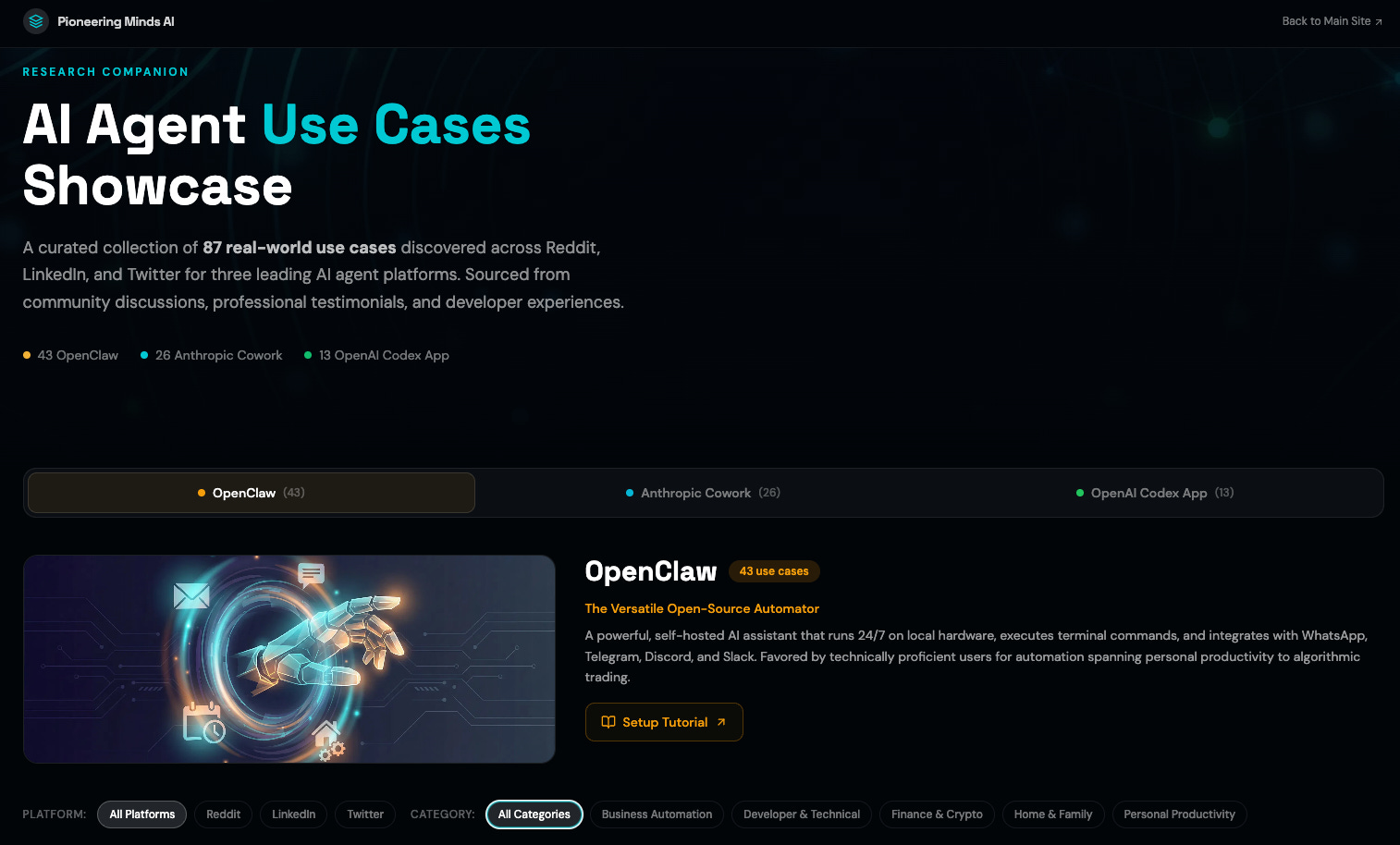
P.S. https://agentcase.pioneeringminds.ai/ contains tutorials and examples for these tools : D
EastCoast AI Events
Panel 02/09 Under the Hood of AI — Vanderbilt Hall, NYU
Application 02/09 The New Landscape of AI-Driven Communication — Virtual
Research 02/10 Teaching AI Ethics Through Project-Based Learning — Virtual
Research 02/11 Scientific Research in the Age of AI — Virtual
Application 02/11 How AI and Emerging Tech Are Shaping Business Transformation — Faculty House, Columbia
Application 02/12 AI in Healthcare: Past, Present, and Next — Columbia Business School
Research 02/13 What Can AI Teach Us About Student Reasoning? — Virtual
Research 02/20 ML and AI Seminar Series: Tom Goldstein — School of Social Work, Columbia
Application 02/21 AI Interfaces Hackathon with Claude — New York, NY
What Is an AI Agent, Really?
AI agents can take many forms with varying degrees of freedom. Frameworks like Google’s ADK, LangGraph, and many others use logical flows with “AI brains” embedded in the workflow. Think of an assistant who can really only help you schedule meetings—it can decide when and where the meeting might happen, but it cannot run your errands, clean up your house, or do grocery shopping for you.
Now, a different type of agent (which is really what the hype is all about today) is these terminal agents—pi-mono (used by OpenClaw), Claude Code, Gemini CLI, and more. I’ve always called these “general purpose agents“ since they can be used to do literally anything if they have the tools and context. Behind the scene, these are just brains on loop—we keep prompting LLMs to do tasks turn by turn. The implementation doesn’t get simpler than Mini SWE Agent if you want to dive into the particulars :D
You can see this pattern across the ecosystem:
OpenClaw is a self-hosted, always-on assistant (pi-mono) that plugs into your messaging apps and runs tool executions: filesystem access, web browsing, CLI actions, and more.
Anthropic’s Cowork packages Claude Code for non-technical users inside Claude Desktop. You describe an outcome, step away, and come back to finished work.
OpenAI’s Codex app is the developer-flavored version: multiple agents in parallel, organized by project threads, with diffs you can review and built-in worktrees so parallel work doesn’t collide.
If you’ve been thinking “cool, a smarter chatbot”—not quite. This is closer to hiring an administrative assistant than installing an app.
Amazing Development… So Why Does This Change Everything?
To use these tools effectively, you give these agents access to all of your files and maybe even more privileges. For example, I gave mine access to WhatsApp (only allows messages from me though), access to my email, calendar and Google Drive, a local personal knowledge base, and basically admin access to my cloud services. This is extremely convenient—but can you imagine the risks involved?
The Failure Mode Is Different Now
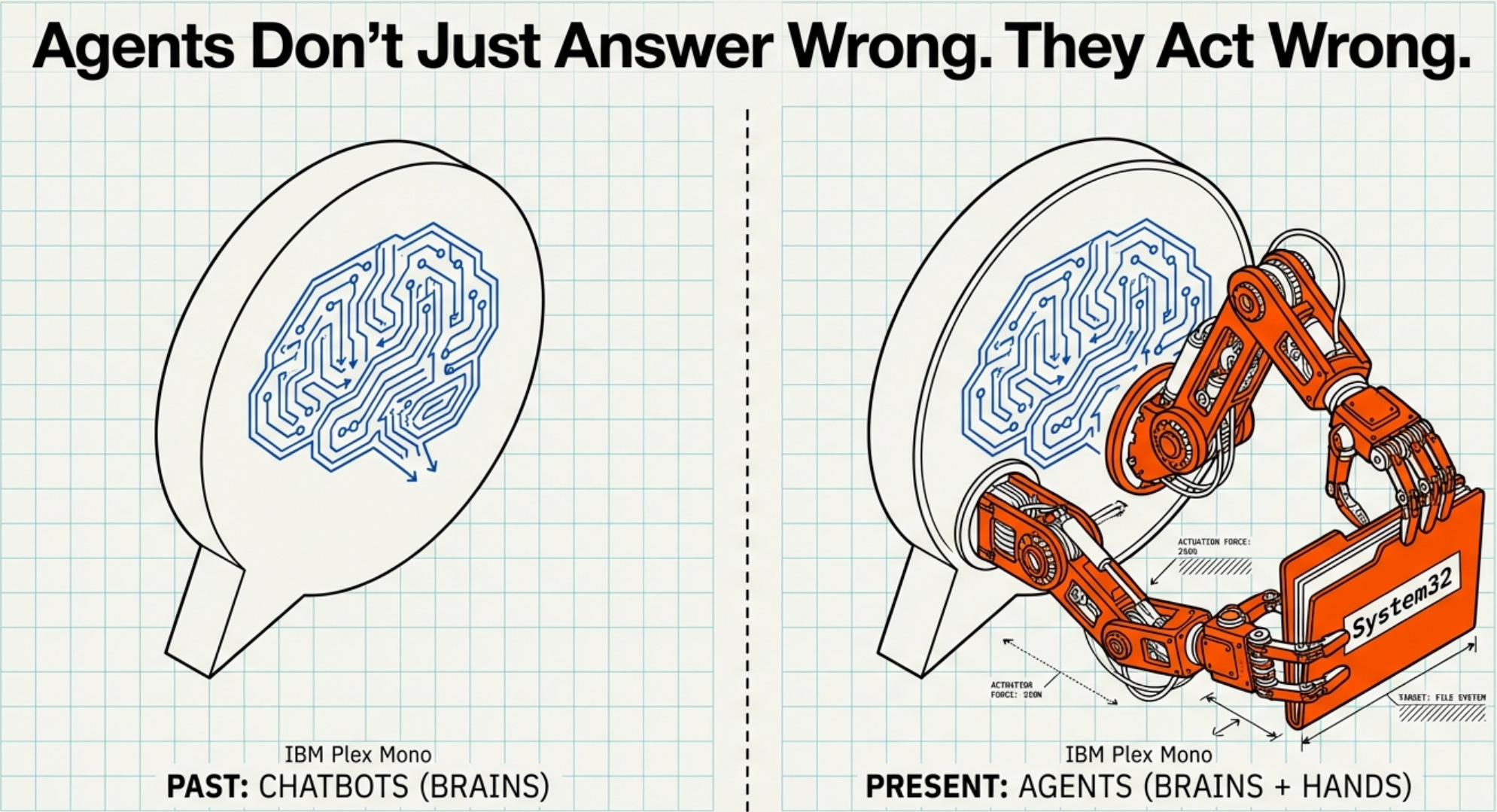
Once an agent can touch files, run commands, browse the web, or message people, the risk shifts. It’s no longer “oops, hallucination.” It’s:
“oops, it deleted the wrong folder”
“oops, it pasted a secret key into the wrong place”
“oops, it got tricked by a webpage and exfiltrated your data”
OpenAI’s safety guidance calls out prompt injections as a common attack vector: untrusted text enters the system and attempts to override instructions—sometimes triggering tool calls or leaking data. They’ve publicly discussed hardening their browser agent against this using automated red teaming.
Now layer on Simon Willison’s warning—the one I wish every agent UI forced you to read before the “Connect your Gmail” button:
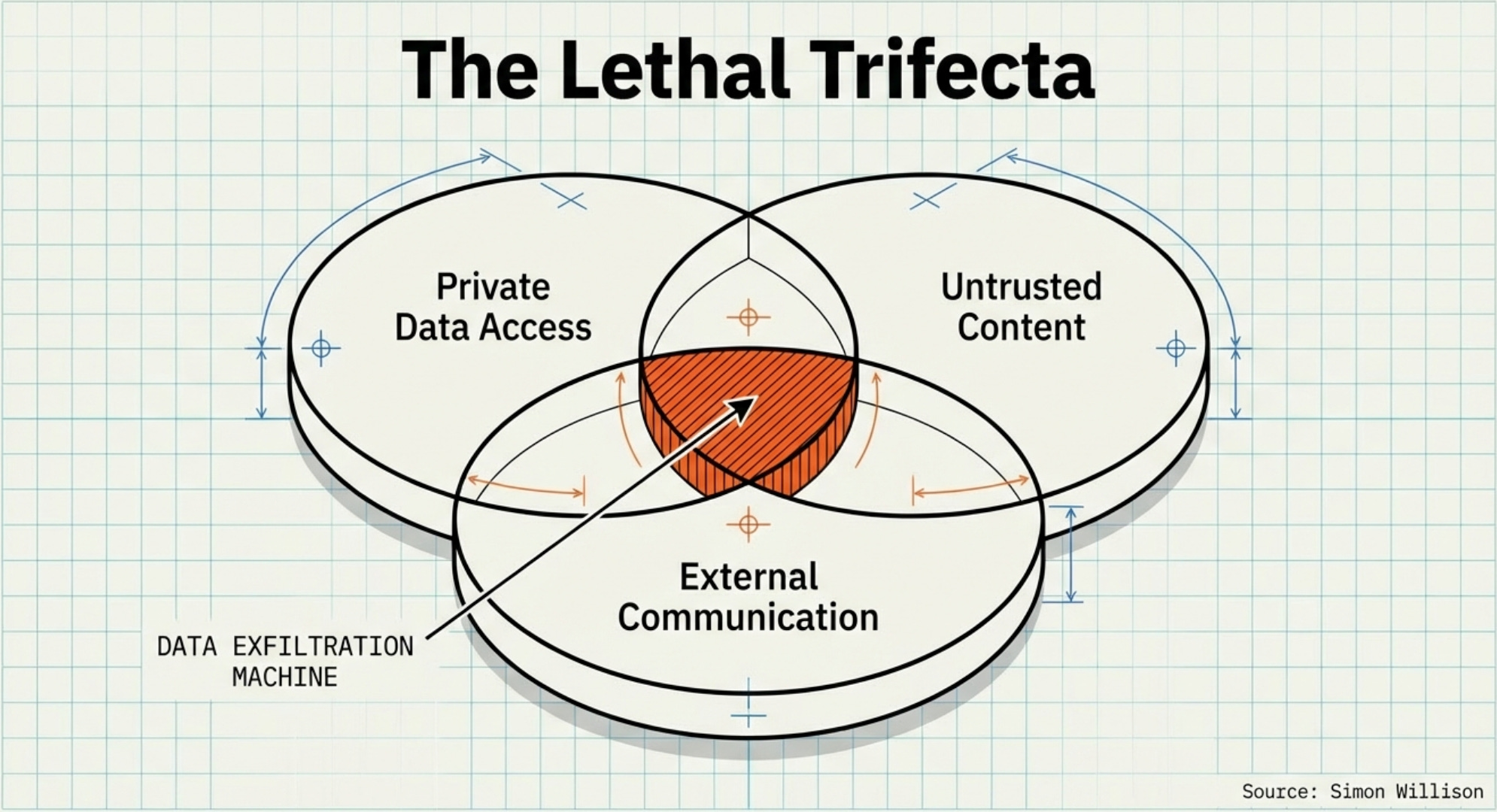
If your agent combines private data access, untrusted content exposure, and external communication, you’ve built a data-exfil machine by accident. — Simon Willison
That’s the “lethal trifecta.”
This Is Not Theoretical Anymore—It’s Already Happening
Four signals from the last few weeks:
Moltbook (a social site for AI agents) exposed private messages, emails, and credentials for thousands of users according to Wiz, reported by Reuters—tied to “vibe coding” speed outrunning security basics.
OpenClaw CVE-2026-25253: A crafted URL could cause a client to connect and send authentication tokens—patched in version 2026.1.29.
Malicious skills: Researchers found add-ons uploaded to ClawHub designed to deliver malware or steal crypto credentials.
Cowork itself is marketed as a “research preview” with unique risks due to its agentic nature—Anthropic warns not to use it for regulated workloads.
If you’re thinking, “Okay, but that’s open-source chaos, enterprise tools will be safer…”—maybe. But the underlying pattern is universal: capability + autonomy + access creates a new attack surface.
The Lobster Cage Protocol 🦞
“Lobster Cage” is my favorite metaphor for OpenClaw-style agents: the claw is powerful… which is exactly why you keep it inside something sturdy.
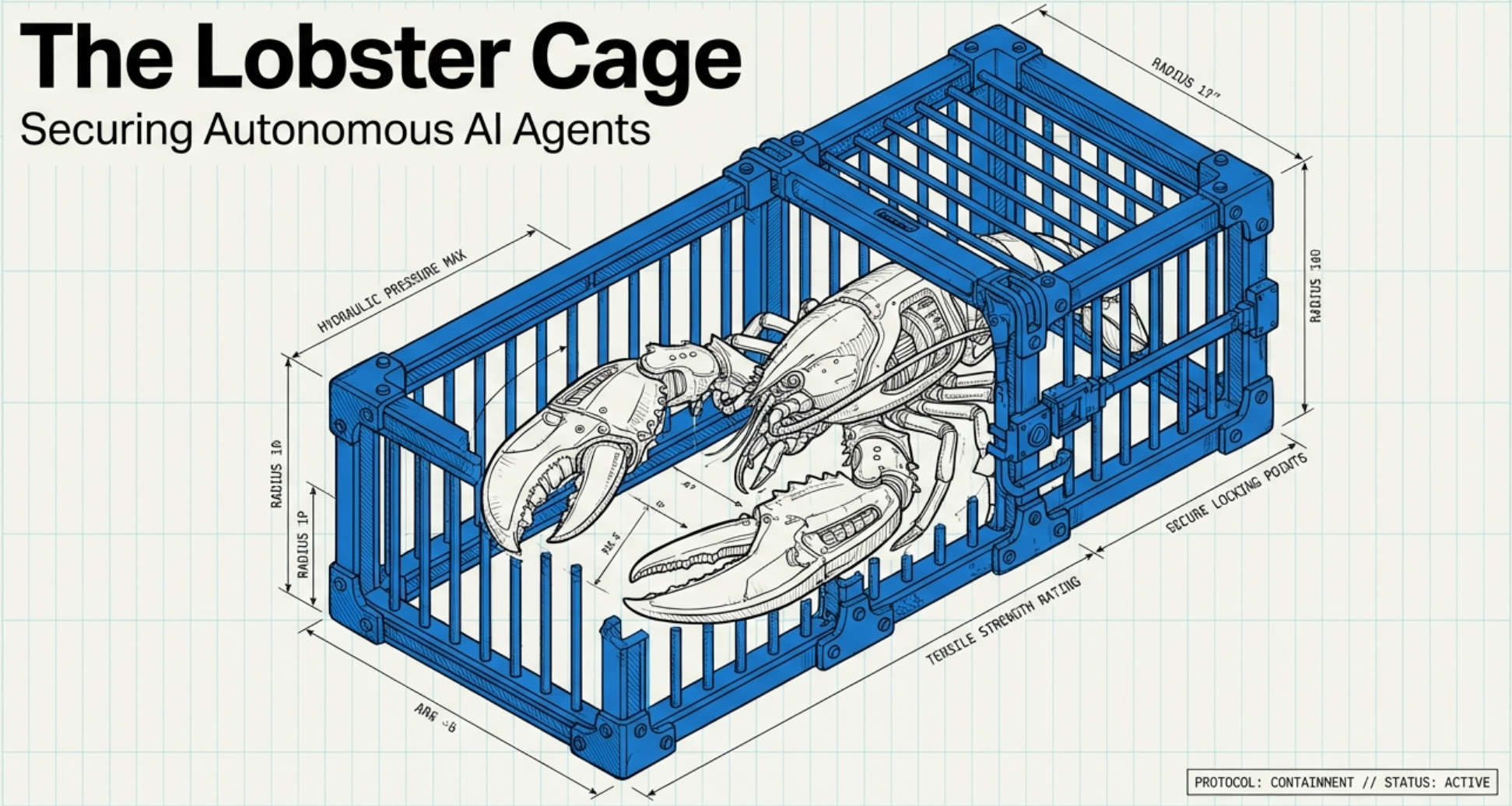
This section is intentionally practical. You should be able to do this on a Sunday night and feel calmer on Monday morning.
Step 1: Pick Your Cage Level
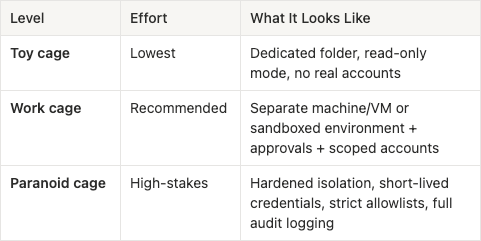
OpenClaw’s own security guidance says: decide who can talk to it (identity), decide where it can act (scope), then assume the model can be manipulated. That ordering is correct.
Step 2: The One Checklist That Actually Matters
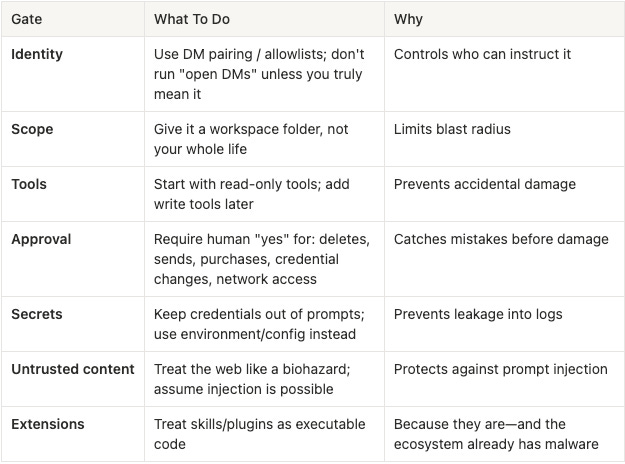
That’s the spine. You can do fancy stuff later.
Step 3: “Monday Morning” Starter Setups
To help you get started and explore what these agents can do, we have compiled community use-cases in
https://agentcase.pioneeringminds.ai/
as well as tutorials on how to set things up for each agent!
OpenClaw: Setting Up Your “Chat-Based Ops Intern”
Safety reminders for OpenClaw:
Keep “web tools” off by default; enable only when needed
Use a “reader agent” pattern: create a read-only agent for untrusted content (web, PDFs, emails), then pass summaries to your main agent
Don’t install random skills from ClawHub like it’s an app store—the ecosystem has already seen malicious uploads
OpenClaw has had serious security issues (now patched), so cage discipline isn’t optional “best practice”—it’s part of using the product responsibly
Cowork: The “Knowledge Worker in a Box” Setup
Best for: Cleaning folders, generating reports, wrangling docs, browser-based workflows—especially for non-devs.
Setup (5 minutes):
Create a folder called
Cowork_Sandbox/Copy in only what you want it to touch
Keep backups (seriously—Cowork can delete files)
When giving instructions, ask it to propose a plan first (”show me what you’ll do”), then execute
Anthropic’s own safety guidance explicitly recommends the dedicated-folder approach because Cowork can read, write, and delete files. Cowork is positioned as a research preview, and Anthropic flags the agent-specific risks (like prompt injection) more directly than most consumer tools.
Codex App: The “Parallel Engineering Line” Setup
Best for: Developers juggling multiple tasks, long-running changes, parallel exploration.
Setup principles:
Use worktrees by default—that’s the point. OpenAI’s docs describe worktrees as the way to run multiple independent tasks without collisions.
Keep permissioning intentional. Codex supports approval policies and read-only modes, and asks for approval when stepping outside the safe boundary (like network access).
Don’t start with 12 agents. Start with 2: one for tests + bugfix, one for refactor + docs. You’ll learn faster and review better.
The one-sentence explanation for why Codex app exists:
The challenge shifted from “can the model code?” to “can humans supervise multiple long-running agents without losing their minds?”
Final Thoughts
Agents with hands are real. They’re also not magic.
They’re powerful precisely because they blur the line between “advice” and “action.” That blur is where productivity comes from… and also where regret comes from.
So, when you actually use these types of agents (I personally recommend cowork for beginners), make sure you limit the directory within which agnets can work.
If you do just one thing after reading: create a dedicated folder (or a disposable VM) today. Then let the agent earn its way to more access.
References & Reading List
Anthropic. (2026). Getting started with Cowork. Claude Help Center. https://support.claude.com/en/articles/13345190-getting-started-with-cowork
Anthropic. (2026). Using Cowork safely. Claude Help Center. https://support.claude.com/en/articles/13364135-using-cowork-safely
OpenAI. (2026). Introducing the Codex app. OpenAI. https://openai.com/index/introducing-the-codex-app/
OpenAI. (2026). Worktrees (Codex app documentation). OpenAI Developers. https://developers.openai.com/codex/app/worktrees/
OpenAI. (2026). Security (Codex documentation). OpenAI Developers. https://developers.openai.com/codex/security/
OpenAI. (n.d.). Safety in building agents. OpenAI Platform Docs. https://platform.openai.com/docs/guides/agent-builder-safety
OpenClaw. (n.d.). Security (Gateway). OpenClaw Documentation. https://docs.openclaw.ai/gateway/security
Willison, S. (2025, June 16). The lethal trifecta for AI agents. Simon Willison’s Weblog. https://simonwillison.net/2025/Jun/16/the-lethal-trifecta/
Satter, R. (2026, February 2). ‘Moltbook’ social media site for AI agents had big security hole, cyber firm Wiz says. Reuters. https://www.reuters.com/legal/litigation/moltbook-social-media-site-ai-agents-had-big-security-hole-cyber-firm-wiz-says-2026-02-02/
The Verge. (2026). OpenClaw’s AI ‘skill’ extensions are a security nightmare. https://www.theverge.com/news/874011/openclaw-ai-skill-clawhub-extensions-security-nightmare
SecurityWeek. (2026). Vulnerability Allows Hackers to Hijack OpenClaw AI Assistant. https://www.securityweek.com/vulnerability-allows-hackers-to-hijack-openclaw-ai-assistant/
“Agents with hands” is the right phrase. Advice is cheap. Authority is dangerous. Treating them like interns with root access is how you stay alive